Automatically compile CoffeeScript on Save with gedit
CoffeeScriptis a nice layer on top of JavaScript that takes away quite many of JavaScripts quirks and rough edges. I really like it as it makes development much more enjoyable to me. It compiles directly to JavaScript which is awesome for compatibility reasons. However that means whenever you change a file and want to test the changes you have to recompile the file. Some editors do this automatically. gedit however doesn’t have CoffeeScript support out of the box. That’s relatively easy to fix however. At first you should go ahead and install syntax highlighting for CoffeeScript. So now we got some nice syntax highliting, looks better right? The auto compile problem is also easy to fix. gedit comes with theExternal Tools plugin which makes it fairly easy to fix this when CoffeeScript is already installed properly (for installation information click here). At first you need to activate the External Tools plugin. Go to Edit->Preferences and then select the Plugins tab. It should look like this: 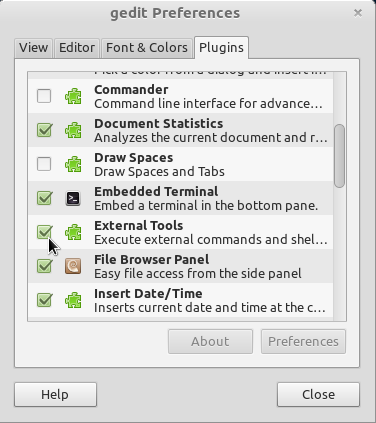 The plugins menu in the gedit preferences Make sure that the box before External Tools is checked. Now you can go to Tools->Manage External Tools… Click on the + on the bottom left in order to add a new tool. Name it however you like and insert the following in the code box:
#!/bin/sh coffee -c $GEDIT_CURRENT_DOCUMENT_PATH
Now you can choose whatever shortcut you would like for this command. If you make sure to set the applicability to CoffeeScript files only and set Save to “Current Document”, then you can even set the shortcut to Ctrl + S. That works beautifully for me. The option to set the applicability to CoffeeScript only might only be available after installing the syntax highlighting for gedit mentioned earlier. Here’s what my settings for my compile CoffeeScript tool look like: 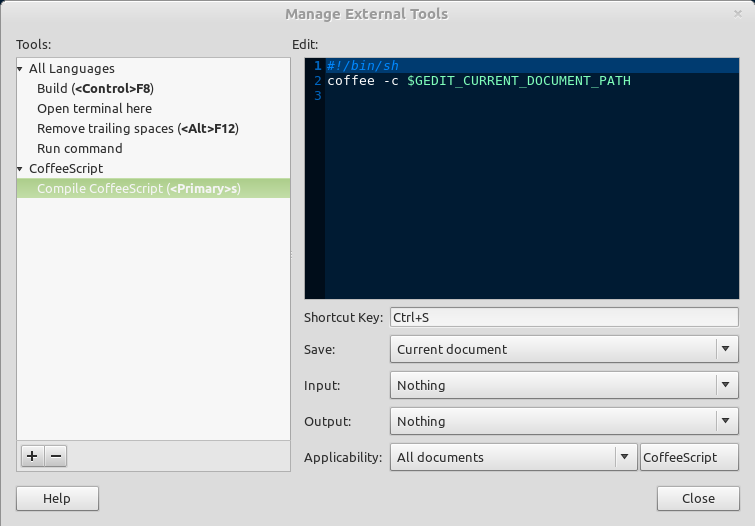 The External Tools Settings for making CoffeeScript compile automatically on save This should do it. If it doesn’t work, feel free to leave a comment so we can sort that out :-) Happy coding everyone! PS: This should also work with pluma, a fork of the old gedit editor from the MATE project