Autostarting applications in Linux Mint Debian Edition
A few days ago I finally made the step to switch from Linux Mint main edition (Linux Mint 10 was getting old) to the all new Linux Mint Debian Edition Release Candidate with the new Cinnamon desktop. It’s been great so far. However I was really missing a feature of the main edition. There you could simply right click on a menu entry and say “Launch on startup”, which has been the most convenient way to add an autostart that I’ve ever seen. Browsing the settings and the web I at first didn’t find a way to autostart applications. I found lots of descriptions involving files and directories that don’t seem to exist in my Linux Mint Debian Edition. Well enough babbling.
Solution
Simply run:
gnome-session-properties
You can do this in the terminal or with Alt + F2 (gnome do). There you have a list of all your startup applications and you may add applications by specifying their command (like: “thunderbird” or “firefox”) but you may also remove startup applications. This looks something like this: 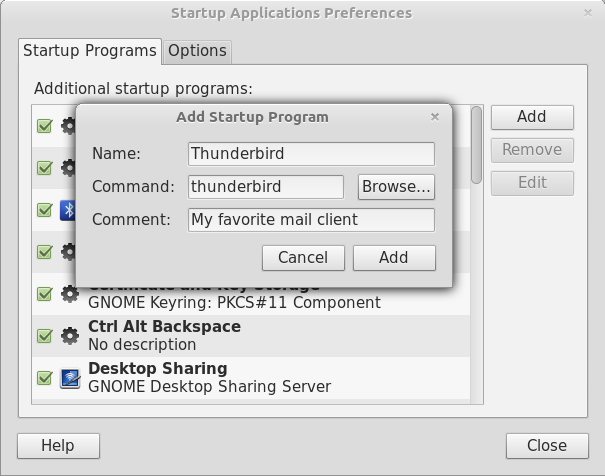 This should work with all Gnome based desktops (Gnome 2, Gnome 3, Mate, Cinnamon), I haven’t tested it though. It’s fairly easy but embarrassingly took me long enough to figure out, so I figured that it’s better to blog about it and maybe save somebody else some time.